
Configuring Read-Only Access for Users in CoreSSH Server
Requirements: CoreSSH Server
Introduction
CoreSSH Server is an easy-to-use solution for managing secure file transfer access and permissions. This guide will focus on the simple steps to configure and manage read-only access for specific users on the server.
Creating a User
Navigate to the Users page in the Admin Console and click New User... Enter the authentication type, username, password, use default root directory or home directory and click on the read-only checkbox.
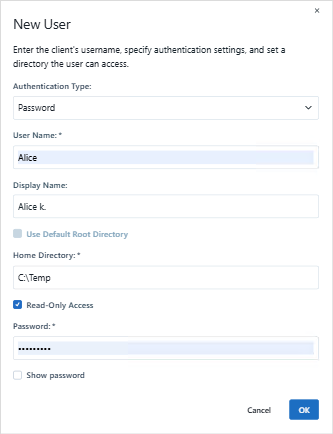
After the user has been created it will be added to the Users list. The Status column shows whether the user is enabled and allowed to authenticate to the server.
Once read-only access is configured, users will be able to authenticate and browse files on the server but will not be able to modify, upload, or delete them.
We appreciate your feedback. If you have any questions, comments, or suggestions about this article please contact our support team at support@coressh.com.